
NordVPN is one of the top choices for Amazon Prime Video in 2026, offering fast, secure streaming and reliable access to multiple regional libraries.
Prime Video content varies by country because licensing agreements limit where certain movies and shows can be viewed.
This guide explains these restrictions, highlights VPN options that provide global access, and shows step-by-step instructions to get started. By the end, you will understand how to safely stream Prime Video content from any region.
Why Do You Need a VPN for Amazon Prime Video?
Amazon Prime Video does not offer the same library worldwide. Content availability depends on your location due to licensing agreements that limit distribution rights in certain regions.
For example, a movie or series available in the U.S. may not be accessible in the U.K., India, or other countries, even for subscribers. According to recent Amazon Prime statistics, more than 240 million users around the world encounter these limitations.
A VPN (Virtual Private Network) lets you connect to a server in another country. Once connected, Amazon sees your connection as coming from that location, giving you access to the content available there.
Additional Benefits of Using a VPN:
Beyond unlocking region-specific content, a VPN improves your privacy and ensures smoother streaming. Internet service providers (ISPs) sometimes reduce bandwidth during peak hours, which can slow down video playback.
Using a VPN prevents this throttling and maintains consistent speeds. It also encrypts your online activity, keeping your data secure, especially useful on public Wi-Fi networks in airports, cafés, or hotels.
Top 5 VPNs For Amazon Prime Video
Amazon Prime Video enforces regional restrictions with strict blocking measures. Some VPN services are designed to help users access content from other countries while maintaining privacy and security.
These VPNs are recommended for users who want to explore Prime Video libraries from different regions in 2026:
| VPN | Prime Video Access | Speed Rating | Countries | No-Logs Policy | Price/Month |
|---|---|---|---|---|---|
| NordVPN | Excellent | Excellent (480 Mbps) | 165 | Audited | $3.09 |
| ExpressVPN | Excellent | Excellent (560 Mbps) | 105 | Audited | $4.49 |
| Surfshark | Very Good | Very Good (380 Mbps) | 100 | Audited | $2.49 |
| IPVanish | Very Good | Very Good (420 Mbps) | 108 | Zero logs | $2.19 |
| CyberGhost | Good | Good (320 Mbps) | 100 | Audited | $2.19 |
These VPNs continue to perform well because they frequently update their IP addresses and server infrastructure. This helps them stay ahead of Prime Video’s detection systems.
Additionally, each offers responsive customer support to assist users with any connection or streaming issues..
1. NordVPN – Best Overall For Prime Video
| Feature | Details |
|---|---|
| Simultaneous Device Connections | 6 |
| Prime Video Regions | US, UK, Canada, Australia, Japan, Germany, France, Italy |
| Smart TV Support | Fire TV (native), Android TV, Router setup |
| Security Features | Advanced kill switch, DNS leak protection, Double VPN, Obfuscated servers |
| Money-back guarantee | 30 days |
| Server Performance | Regularly updated IPs, obfuscated servers for bypass detection |
NordVPN delivers the best overall experience for Prime Video streaming. The service works smoothly with seven major Prime Video libraries across different countries.
Its obfuscated servers hide VPN traffic from Amazon’s detection systems. The company maintains an audited no-logs policy to protect your privacy.
Customer support is available 24/7 to assist with any issues. You can also set up NordVPN on your router for whole-home protection across all devices.
Best for: Users who need reliable access to multiple Prime Video regions with strong security features and consistent performance across all their devices.
2. ExpressVPN – Best for Speed and Reliability
| Feature | Details |
|---|---|
| Simultaneous Device Connections | 8 |
| Prime Video Regions | US, UK, Canada, Australia, Japan, India, Brazil, Mexico |
| Smart TV Support | Fire TV (native), Apple TV, Android TV, Router setup |
| Security Features | TrustedServer technology, Network Lock (kill switch), Split tunneling, Private DNS |
| Money-back guarantee | 30 days |
| Server Performance | Fastest speeds tested, premium server infrastructure, automatic server selection |
ExpressVPN: Provides the highest speeds among all tested VPN services. This makes it ideal for streaming 4K content without any buffering issues. The service works with 8 different Prime Video regions, which is more than most competitors.
You can connect up to eight devices simultaneously on a single subscription. The TrustedServer technology runs all servers on RAM, which erases your data with every reboot.
Customer support responds quickly and solves most Prime Video issues effectively. This ensures you can enjoy streaming without constant ad interruptions or connection problems.
Best for: Users who prioritize the fastest possible streaming speeds and need to connect multiple devices at once without compromising video quality or performance.
3. Surfshark – Best for Value
| Feature | Details |
|---|---|
| Simultaneous Device Connections | Unlimited |
| Prime Video Regions | US, UK, Canada, Australia, Japan, Netherlands |
| Smart TV Support | Fire TV (native), Android TV, Apple TV, Router setup |
| Security Features | CleanWeb (ad blocker), MultiHop, Kill switch, Camouflage Mode, NoBorders mode |
| Money-back guarantee | 30 days |
| Server Performance | Good IP rotation, NoBorders feature for restrictive networks |
Surfshark offers excellent value by allowing unlimited simultaneous connections on a single subscription. This makes it perfect for families or users with multiple devices.
The NoBorders feature automatically activates when it detects network restrictions. This helps you access Prime Video even in environments with strict internet controls.
Performance remains solid across all six supported Prime Video regions. The CleanWeb feature blocks advertisements for uninterrupted viewing experiences.
Best for: Budget-conscious users who need to protect unlimited devices and want solid Prime Video access without spending significant amounts on monthly subscriptions.
4. IPVanish – Best for Customization
| Feature | Details |
|---|---|
| Simultaneous Device Connections | Unlimited |
| Prime Video Regions | US, UK, Canada, Australia, Germany |
| Smart TV Support | Fire TV (native), Android TV, Router setup |
| Security Features | SOCKS5 proxy, Split tunneling, Kill switch, Scramble (obfuscation) |
| Money back guarantee | 30 days |
| Server Performance | Large US server network, good for Prime Video US content |
IPVanish owns its entire server network, which provides better control over performance and security. The service excels at accessing US Prime Video content due to its extensive American server infrastructure.
You get unlimited simultaneous connections on a single account. The service offers advanced customization options that let you fine-tune connection settings.
The Scramble feature hides VPN traffic from detection systems. This makes it harder for Amazon Prime Video to identify and block your connection.
Best for: Users who prefer advanced customization options and primarily need access to US Prime Video content with enhanced control over their connection settings.
5. CyberGhost – Best for Beginners
| Feature | Details |
|---|---|
| Simultaneous Device Connections | 7 |
| Prime Video Regions | US, UK, Germany, France, Japan |
| Smart TV Support | Fire TV (native), Android TV, Apple TV, Router setup |
| Security Features | Automatic kill switch, DNS leak protection, Ad blocking, Dedicated streaming servers |
| Money-back guarantee | Up to 45 days |
| Server Performance | Optimized streaming servers, clear server labels for ease of use |
CyberGhost simplifies VPN usage with clearly labeled servers designed specifically for streaming. You can select servers marked “For streaming Amazon Prime Video US” instead of testing random servers.
The 45-day money-back guarantee provides more time to test the service compared to other options. Setup takes only a few minutes, even for users with no previous VPN experience.
Best for: First-time VPN users who want a straightforward setup with clearly marked servers for Prime Video streaming and an extended testing period.
Note: CyberGhost provides limited Prime Video access compared to NordVPN and ExpressVPN, and speeds are slower during peak usage hours.
Best Free VPNs for Amazon Prime Video
Free VPNs are not recommended for Amazon Prime Video due to reliability issues and frequent blocking. However, these two options occasionally provide access if you need a temporary solution.
1. Windscribe – Most Reliable Free Option
| Data Allowance | 10GB per month |
| Prime Video Access | Better at unblocking streaming platforms, including Amazon Prime Video |
| Strengths | Fast streaming speeds, good unblocking capabilities |
| Limitations | Limited monthly data, not 100% reliable |
| Best For | Occasional viewing or testing Prime Video access |
Windscribe provides 10GB of monthly data, which allows approximately 3-4 hours of streaming in standard definition. It performs better at unblocking streaming platforms, including Amazon Prime Video, than most free alternatives.

The speeds are adequate for smooth playback without constant buffering issues. However, the monthly data limit means you cannot rely on it for regular viewing sessions.
Prime Video detection systems occasionally block access, making the service unreliable for consistent use.
2. Proton VPN – Unlimited Data But Limited Servers
| Data Allowance | Unlimited (rare for free VPNs) |
| Prime Video Access | Fast, secure servers that don’t track activity |
| Strengths | Connect to Plus servers in supported countries |
| Limitations | Can’t choose server location on free plan, Prime Video may not always work |
| Best For | Privacy-conscious users who don’t mind limited server choice |
Proton VPN stands out by offering unlimited data on its free plan. This is uncommon among free VPN services. The company operates fast, secure servers that do not track your activity.
You can connect to Plus servers in supported countries where Prime Video access might work. The main limitation is that you cannot choose specific server locations on the free plan.
Prime Video does not always work with these servers. The service remains useful for privacy protection, even when streaming access is inconsistent.
Free VPNs face serious limitations when dealing with Amazon Prime Video’s detection systems.
Why Free VPNs Struggle with Prime Video
Free VPNs often fail to bypass Amazon Prime Video’s strict regional blocks because they have limited resources.
- Limited Server Networks: Free VPNs have fewer servers, so blocked IPs take longer to change.
- Overcrowded Servers: Many users share the same server, causing slow streaming and frequent pauses.
- No Support: If a problem occurs, free VPNs offer no help to fix streaming issues.
- Speed Limitations: Free services often slow down video, making playback stop or buffer frequently.
Recommendation: Paid VPNs are more reliable, with updated servers and money-back guarantees for uninterrupted Prime Video access
How To Set Up a VPN for Amazon Prime Video
Setting up a VPN for Prime Video is pretty simple and usually only takes around 10 minutes. By following these steps carefully, you’ll be able to watch shows and movies from different regions without much hassle.
- Step 1: Choose the right VPN
Pick a VPN that works for your needs and budget. Longer plans often save money, but if you just want to try it out, a monthly plan works fine.
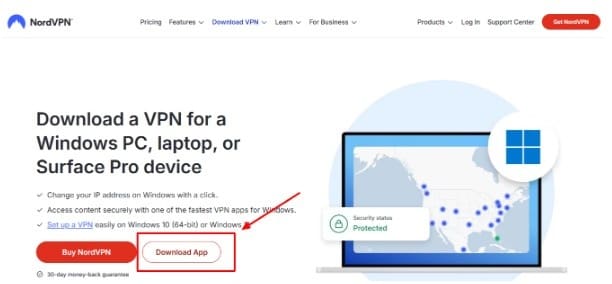
- Step 2: Install the VPN app
Go to the provider’s website or app store and download the app. Install it, then log in with your account details. It usually sets itself up automatically.
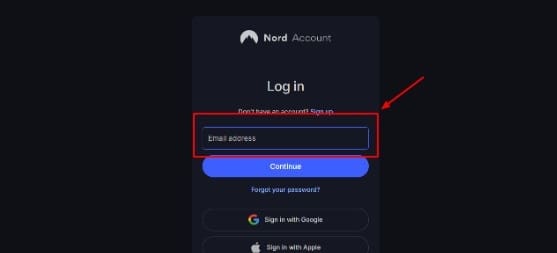
- Step 3: Connect to the server you need
Open the VPN and choose a server in the country whose Prime Video library you want to access. It only takes a few seconds to connect.
- Step 4: Clear your browser data
Before opening Prime Video, clear your browser’s cache and cookies. This removes old location info that can block content from updating.
- Step 5: Start watching Prime Video
Open the app or browser and check the library. If you still see your home region, disconnect, clear the cache again, and reconnect to another server.
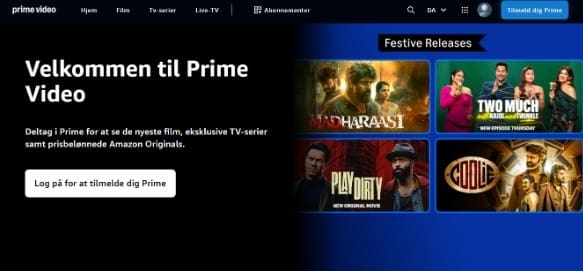
A little extra tip: clearing cookies and cache really helps, because skipping this step is the most common reason streaming doesn’t switch regions properly.
With 24/7 customer support and money-back guarantees, users can test compatibility risk-free, similar to Amazon’s 90-day Prime membership Prime Video free trial, ensuring uninterrupted, high-quality viewing.
How Does Amazon Prime Video Detect VPNs?
Amazon Prime Video has systems in place to identify VPN usage and restrict access to content that is limited by region. Understanding these checks can help you use a VPN more effectively and avoid streaming interruptions.
1. IP Address Blacklisting
Amazon keeps a list of IP addresses known to belong to VPN servers. If you connect using one of these, your access may be blocked. To maintain uninterrupted streaming, reliable VPNs regularly refresh their IP addresses.
2. DNS Leak Detection
Even when connected to a VPN, your DNS requests can reveal your true location. If Amazon sees a mismatch between your VPN location and DNS information, it may block content. Using a VPN that prevents DNS leaks helps avoid this problem.
3. Browser Cookies and Cache
Cookies and cached data from previous sessions can expose your real location. If this information conflicts with the VPN server, Prime Video may not display content correctly. Clearing cookies and cache before streaming is an important step.
4. Multiple Connections from the Same IP
When many users connect from the same VPN server, Amazon can flag it as an unusual activity. This often leads to temporary blocking. Switching to another server with fewer users can resolve the issue quickly.
5. WebRTC Leak Detection
Some browsers use WebRTC technology, which can reveal your real IP address even when a VPN is active.
If Amazon detects this, your VPN connection may be blocked. Disabling WebRTC or using a VPN that protects against it ensures smooth streaming.
Common Error Messages
If Prime Video detects your VPN, you might see errors such as:
“Content not available in your location” means that the VPN IP was blocked.
“Proxy server detected,” which means, Amazon has noticed VPN traffic.
“Connection timeouts” are usually when too many users share the same IP.
Troubleshooting Common Prime Video VPN Issues
Even reliable VPNs can occasionally face problems with Prime Video.
Understanding common issues and their fixes ensures a smooth and uninterrupted viewing experience, preventing frustration from constant ad interruption or playback errors.
1. Content Not Available Error Fix
Switch to another server in the same country. Clear browser cache and cookies to refresh the content library.
2. Slow Streaming or Buffering
Connect to a server nearer to your location, close bandwidth-heavy apps, and lower video quality if needed.
3. VPN Detected Error Messages
Enable obfuscation features, connect during off-peak hours, update the VPN app, or try a compatible provider.
4. Solutions to Enhance Your Prime Video Viewing Experience
Use dedicated streaming servers, configure the VPN to launch automatically, or set it up on your router.
Following these steps improves streaming reliability, prevents interruptions, and ensures uninterrupted access to Prime Video content, without constant ad interruptions.
Is Using a VPN with Prime Video Legal?
Using a VPN with Prime Video is generally legal, as VPNs are allowed in most countries. They help protect your privacy, but using them to access content outside your region violates Amazon’s terms of service.
While account termination is rare, Amazon reserves the right to enforce it. Additionally, some countries restrict VPN use, so always check local laws before streaming with a VPN.
Conclusion: NordVPN is the Best VPN for Amazon Prime Video
NordVPN offers the most reliable access to Prime Video across multiple regions, delivering fast speeds, strong security, and wide server coverage.
ExpressVPN ensures smooth 4K streaming, while Surfshark provides great value for users needing unlimited device connections. Free VPNs rarely work consistently, so choosing a paid service with a money-back guarantee is wise.
By following setup instructions carefully and using troubleshooting tips when needed, you can enjoy seamless, unrestricted Prime Video streaming. Also, you can try VPN risk-free trials and experience hassle-free streaming.
FAQs
Using a VPN lets you access Prime Video libraries from other countries by masking your location. Reliable services like NordVPN or ExpressVPN ensure uninterrupted streaming.
NordVPN’s obfuscated servers and regularly rotated IPs reduce the chance of detection. Occasionally, a server may be blocked, but access is quickly restored through new IPs.
Connect to a server in your chosen country, clear your browser’s cache and cookies, then open Prime Video to view that region’s content library.
Amazon identifies VPNs using IP blacklists, DNS leaks, browser cookies, multiple connections from a single IP, and WebRTC leaks that reveal your actual location.
Windscribe and ProtonVPN offer limited free access, but paid VPNs provide reliable speeds, updated servers, and consistent streaming without interruptions.
